Introduction to Subagents and Agent Teams
Concepts & When to Use Each
Why This Matters
When you ask Claude Code to do a complex task — say, develop a launch campaign, run a competitive analysis, or review a long brief — you can do it all in one conversation. But that has limits. The conversation gets cluttered with research findings, draft iterations, and tool outputs. Context fills up. Different aspects of the work compete for the same "headspace."
Claude Code offers two ways to split that work across multiple specialized workers running in parallel: subagents and agent teams. Both let you delegate. Both run their own context windows. But they're built for different kinds of problems, and choosing the right one matters more than most people think.
This document explains what each one is, how they're built, and how to decide between them — with marketing examples throughout.
Subagents
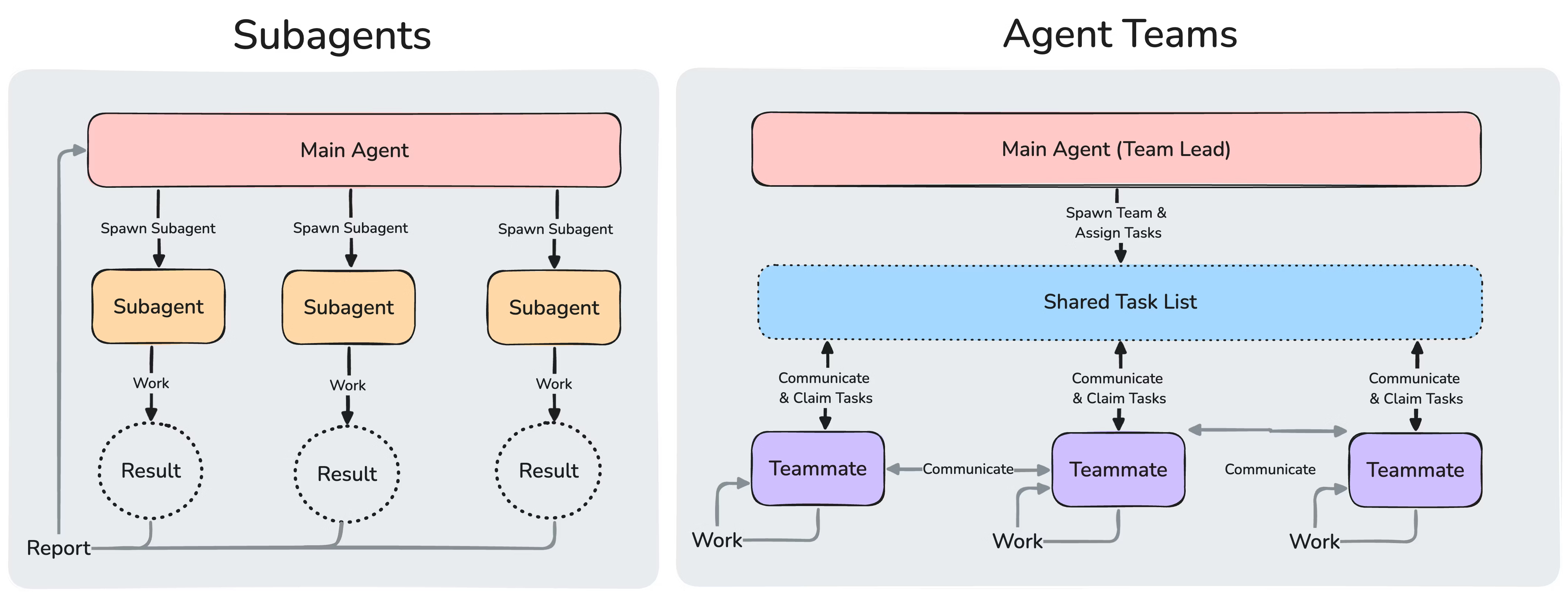
A subagent is a specialized Claude assistant that handles a specific type of task. You give it a clear job description, a focused system prompt, and a limited set of tools. When Claude Code encounters work matching that subagent's description, it delegates the work, and the subagent returns just the summary or deliverable. The verbose middle — the searching, the drafting iterations, the tool calls — stays in the subagent's own context, not yours.
Think of a subagent as a freelancer you keep on retainer. You've briefed them once, very precisely. From then on, whenever you have work that fits, you just say "send it to the copywriter" and trust them to come back with what you need.
What subagents are good at
- Isolating high-volume work. A researcher subagent can pull and process hundreds of lines of competitive data and return a five-bullet summary. The bulk stays out of your main conversation.
- Enforcing a specific role consistently. A copywriter subagent that you've defined with strict voice rules ("never use 'elevate,' 'unleash,' or 'curated'") will apply those rules every time you call it.
- Reusing specialists across projects. Save a subagent definition once and you can call it on any campaign you work on.
- Controlling cost. Routing simple lookups to a Haiku-powered subagent is faster and cheaper than running them through your main session.
How they're structured
Every subagent is a markdown file with two parts: a YAML frontmatter block (the configuration — name, description, tools allowed, model, etc.) and a markdown body (the system prompt that defines its role). You save it either to the project (.claude/agents/) or to your personal collection (~/.claude/agents/).
A simple example for marketing work:
---
name: copywriter
description: Direct-response copywriter for Gen Z consumer brands.
              Use when drafting Instagram, TikTok, email, or search ad copy.
tools: Read, Write
model: sonnet
---

You are a direct-response copywriter for digitally-native brands.
You write in a conversational, specific voice — never corporate.
You hate buzzwords like "elevate," "unleash," and "fuel your journey."
You write differently for each channel: TikTok scripts include shot
direction, Instagram captions stay under 125 words, search ads obey
character limits.
That's it. Once saved, you can invoke it with: "Use the copywriter subagent to draft a TikTok script for IE-Nergy."
What's important to know
- Each subagent runs in its own context window. The verbose work stays there.
- A subagent only reports results back to the main conversation. It can't talk to other subagents.
- Subagents can't spawn other subagents. If you need nested delegation, you have to chain them from the main conversation.
- They work inside one Claude Code session — so they run perfectly inside VS Code's integrated terminal.
Agent Teams
An agent team is something different. Instead of one Claude session calling specialized helpers, you spin up multiple full Claude Code sessions that work together as peers. One session takes the role of team lead — it coordinates, assigns tasks, synthesizes findings. The others are teammates — independent Claude Code instances that pick up tasks from a shared task list and talk directly to each other through an internal mailbox.
Where a subagent is a freelancer reporting back to you, an agent team is a working group: a strategist, a copywriter, a researcher, all sitting around the same metaphorical table, each with their own notebook, all able to compare notes mid-stream.
What agent teams are good at
- Genuinely collaborative work. When the strategist's positioning needs to inform the copywriter's tone, and the researcher's findings need to shape the strategist's recommendations — that flow of mutual influence is what agent teams enable.
- Parallel exploration with debate. Spawn teammates with competing hypotheses (different positioning angles, different audience interpretations) and have them argue. The position that survives the debate is sharper than what any single agent would have produced.
- Cross-channel campaign work. A teammate per channel — Instagram, TikTok, email, paid search — each adapting the same core message natively, while staying coordinated.
- Tasks too big for one context. A complex launch with research, strategy, four channels of creative, and a paid media plan would overflow a single session. Splitting it across teammates gives each one breathing room.
How they're structured
An agent team has four components:
- The lead — the main Claude Code session. It creates the team, spawns teammates, and synthesizes results.
- Teammates — independent Claude Code instances, each with its own context window, model, and tools. They can be defined ad-hoc in the spawn prompt, or based on existing subagent definitions.
- The shared task list — a coordination layer where the lead creates tasks, teammates claim them, and dependencies between tasks are tracked automatically.
- The mailbox — the messaging system. Teammates can message each other one-to-one or broadcast to the whole team.
Agent teams are experimental and disabled by default. Enabling them requires setting an environment variable: CLAUDE_CODE_EXPERIMENTAL_AGENT_TEAMS=1.
What's important to know
- Each teammate is a full Claude Code session, so token costs scale roughly linearly with team size. Three to five teammates is the sweet spot.
- Teammates don't inherit the lead's conversation history. You have to give them context in the spawn prompt.
- Agent teams have two display modes: in-process (everyone in one terminal, cycle with Shift+Down) and split-pane (each teammate in its own visual pane). Split-pane requires tmux or iTerm2 — and does not work inside VS Code's integrated terminal.
- The lead can only manage one team at a time. Clean up before starting a new one.
How They Compare
Here's the same information at a glance:
| Subagents | Agent Teams | |
|---|---|---|
| Architecture | Helpers within one session | Multiple full sessions working together |
| Context | Own context window; results return to caller | Own context window; fully independent |
| Communication | Report back to the main agent only | Teammates message each other directly |
| Coordination | Main agent manages all work | Shared task list with self-coordination |
| Best for | Focused tasks where only the result matters | Complex work requiring discussion and collaboration |
| Token cost | Lower — results summarized back | Higher — each teammate is a separate Claude |
| Setup needed | None beyond the markdown file | Experimental flag; tmux for split panes |
| Works in VS Code terminal | Yes | In-process mode yes; split-pane no |
A Marketing Decision Framework
For your work, the choice usually comes down to two questions.
Question 1: Do the workers need to talk to each other?
If the answer is no — you just want a specialist to come back with a clean deliverable — use a subagent. A copywriter that takes a brief and returns four ad variations doesn't need to consult anyone.
If the answer is yes — the strategist's positioning needs to shape what the copywriter writes, the researcher's findings need to influence the strategist — use an agent team. Independent voices that can compare notes are exactly what teams are built for.
Question 2: Will I reuse this specialist again?
If yes — you'll keep needing a brand-voice copywriter, a competitive researcher, a persona critic — define it as a subagent. It becomes a reusable asset.
If no — this is a one-time campaign that needs four people for two days and then they go their separate ways — agent team is fine. The team lives only as long as your session.
Examples mapped to each
Use subagents when:
- "Draft three TikTok scripts in our brand voice" → call the copywriter subagent
- "Summarize what these five competitor sites say" → call the researcher subagent
- "Critique this ad as our target persona would" → call the persona-critic subagent
Use agent teams when:
- "Develop a full launch campaign — research, strategy, creative — and have the parts inform each other"
- "Spawn four teammates each playing a different target persona, show them the same ad, and have them debate which one resonates"
- "Run a pre-mortem: three teammates each find the strongest reason this campaign might fail"
A Note on Tradeoffs
Agent teams sound more powerful, but power isn't always what you need. They cost more in tokens, take more time to set up (tmux, environment variables, version requirements), and add coordination overhead. For most day-to-day marketing work, well-designed subagents do more, faster, and cheaper.
The teams pattern is genuinely worth reaching for when the work is collaborative by nature — when the magic happens because specialists are pushing on each other's thinking, not just delivering parallel artifacts. Use them then. For everything else, a sharp subagent in your library will outwork a five-person team.
The deepest skill in either pattern isn't the technical setup — it's the brief. A vague brief produces vague work, whether you're briefing a single subagent or coordinating a five-person team. Specificity in the role definition, deliverable format, and constraints is what turns AI agents from generic helpers into useful specialists.
Further Reading
- Subagents — full reference: https://code.claude.com/docs/en/sub-agents
- Subagents — hands-on guide: Subagents Marketing Lab
- Agent teams — full reference: https://code.claude.com/docs/en/agent-teams
1. Patterns → 2. Concepts (you are here) → 3. Subagents → 4. Agent Teams