
← All workflows
n8n Workflows for Marketing · Workflow 02

Reference image
to viral AI video.

A Telegram-triggered n8n workflow that turns a reference image plus a short caption into a branded, 9:16 AI-generated video — published straight to X (Twitter) via Buffer. Image generation by Google Gemini 2.5 Flash Image ("NanoBanana"), video generation by Google Veo 3.1, script writing by GPT-4.1-mini. End-to-end run time: under 5 minutes.

Download the workflow (.json) Credentials setup → Jump to node anatomy
01
Overview

What this workflow does.

Three sequential steps, triggered by a single Telegram message carrying a photo + caption. The entire pipeline runs in one execution — user message in, video published out.

🖼️
Step 1 · ~20 s

Image generation

OpenAI Vision analyses the reference photo. A GPT-4.1-mini agent writes a UGC-style image prompt. Google Gemini 2.5 Flash Image ("NanoBanana") generates a fresh, casual-looking image. The result is posted back to you in Telegram so you can approve before the video kicks off.

🎬
Step 2 · ~2-4 min

Video generation

A second AI agent drafts a structured video script (prompt, caption, title, hashtags). Google Veo 3.1 renders a 9:16, 8-second video using the NanoBanana image as its first frame. A polling loop keeps checking the long-running operation until the video is ready.

🚀
Step 3 · ~5 s

Publish + notify

The finished video is hosted temporarily on Telegram to obtain a public URL, then published to X (Twitter) through Buffer's GraphQL API with the AI-written caption and hashtags. A final Telegram message confirms success with a link to the post in Buffer.

💡

Why Telegram as the interface?

It's the fastest way for a non-technical marketer to trigger a complex pipeline. No dashboard, no login — just send a picture to the bot with a caption describing the video you want. The bot replies with the image, then a few minutes later with the finished video and a "published" confirmation.

💰

Heads-up on cost

Each run costs approximately $3.30 (mostly Veo 3.1) or $1.70 if you switch to veo-3.1-fast-generate-preview — this workflow already uses the Fast model. Set a daily spend cap in Google AI Studio before giving the bot to students.

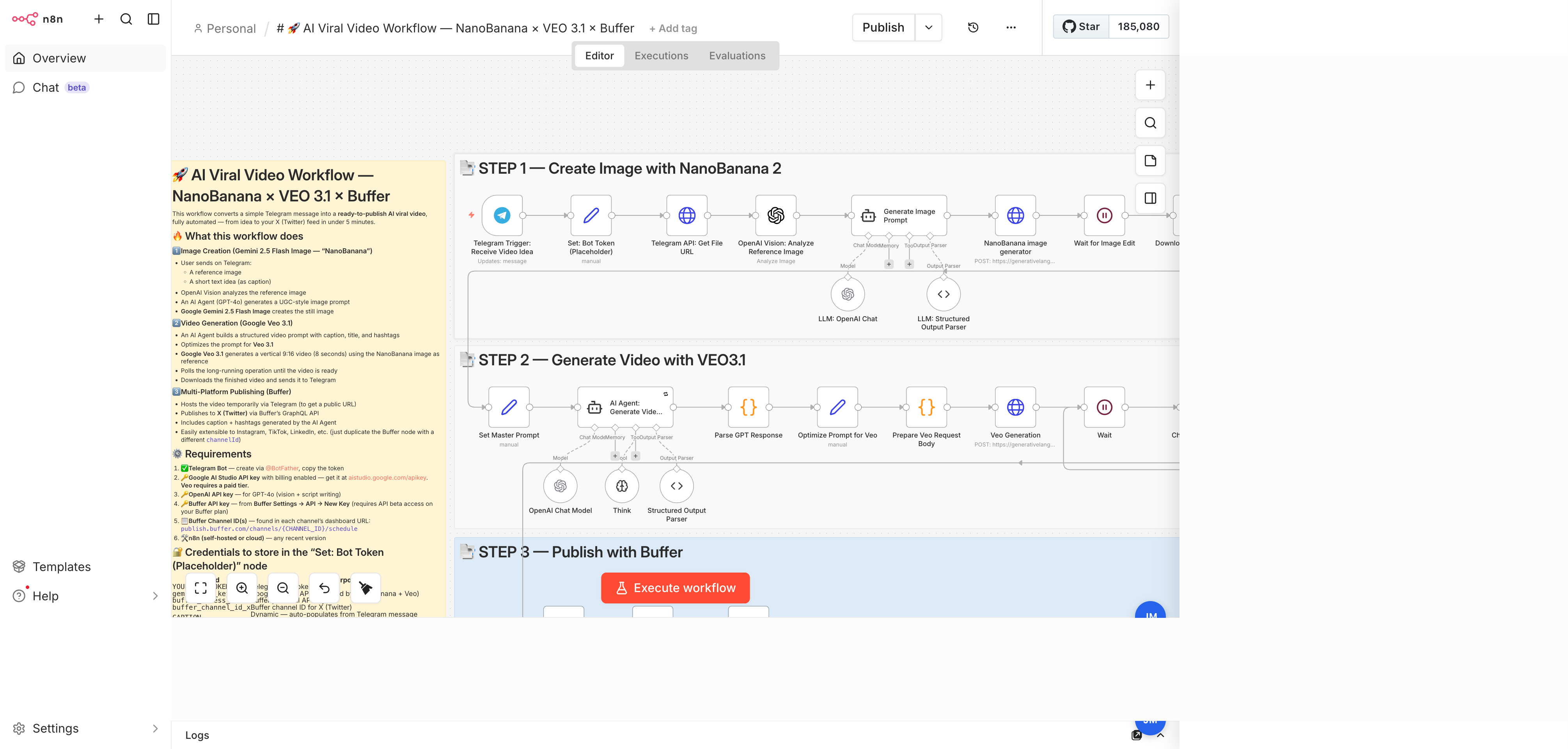
The workflow on the canvas

This is what the three flows look like after you import the JSON. The orange sticky on the left is the in-canvas README; the three grey bands group the nodes of each step.

n8n canvas for the AI Viral Video workflow: three sticky-note bands labelled Create Image with NanoBanana, Generate Video with VEO 3.1, and Publish with Buffer, plus a long orange documentation sticky on the left.
Three sticky-note bands · Flow A (top) → Flow B (middle) → Flow C (bottom) · long orange sticky = in-canvas README
02
Prerequisites

Five services to wire up.

Detailed setup for each is in the central Credentials reference. A quick summary below.

💬
Interface

Telegram bot

Create via @BotFather: /newbot, pick a name, copy the HTTP API token. Send the bot a /start message from your own account so it can chat with you.

🟠
Image + video generation

Google AI Studio (Gemini)

At aistudio.google.com/apikey, create an API key with billing enabled. The same key covers Gemini 2.5 Flash Image (NanoBanana) and Veo 3.1. Veo is paid-tier only — confirm billing is active before running.

Script + vision

OpenAI

The same OpenAI key from Workflow 01 works. Used here for GPT-4o Vision (analysing the reference image) and GPT-4.1-mini (both agents).

🔀
Social publishing

Buffer

Reuse the Buffer access token from Workflow 01. You'll also need your X channel ID (copy it from the channel's URL in Buffer Publish).

🤖
Host

n8n

Must be publicly reachable so Telegram can POST to the trigger's webhook. n8n Cloud works out of the box; self-hosted needs a public URL (ngrok, Cloudflare Tunnel, or a deployed instance).

⚠️
Not needed here

Google OAuth

Unlike Workflow 01, this one does not touch YouTube, Sheets or Blogger. No Google Cloud OAuth client required.

03
Quick start

Import, paste, run.

Five steps from zero to a published video.

01
Download + import

Save ai-viral-video.json. In n8n: Workflows → Import from File.

02
Open the Set node

Open the Set: Bot Token (Placeholder) node. Replace the five REPLACE_WITH_* placeholders: Telegram bot token, Gemini API key, Buffer access token, Buffer channel ID, Buffer organization ID.

03
Link credentials

Each Telegram node and each OpenAI node wants a credential. Pick your Telegram API and OpenAI API credentials (create them from the panel if you haven't yet).

04
Activate the workflow

Click Active (top-right). The Telegram trigger is a webhook — it only fires while the workflow is active.

05
Send your bot a photo

Open your bot in Telegram, send a reference image with a caption like "a woman running on a beach at sunset". Watch the canvas light up.

⚠️

Veo's audio safety filter

Avoid prompts that describe music, dialogue, voiceover, sfx, or sound — Veo's audio RAI filter is aggressive and will block the generation. The Prepare Veo Request Body code node already strips these words defensively, but keep your captions clean too.

04
Node anatomy

29 nodes, three flows.

Detailed walkthrough of every functional node in the canvas. Four sticky notes are documentation only and not covered here.

Flow A · Image creation with NanoBanana

A1💬

Telegram Trigger: Receive Video Idea

n8n-nodes-base.telegramTrigger · updates: message

The workflow's entry point. Fires whenever your bot receives a message. The trigger exposes message.photo[] (array of progressively larger thumbnails), message.caption (text), and message.chat.id (used later to reply to the same chat).

Out1 item · Telegram message payload
CredentialTelegram API — linked after import.
A2📌

Set: Bot Token (Placeholder)

n8n-nodes-base.set · Edit Fields

The single source of truth for every ID and token used downstream: YOUR_BOT_TOKEN, gemini_api_key, buffer_access_token, buffer_channel_id_x, buffer_organization_id, plus CAPTION (auto-populated from the Telegram message). Edit this one node to retarget the workflow; every downstream reference updates automatically.

GotchaFive placeholders to replace. Doing this once here saves editing 10+ downstream nodes.
A3🔗

Telegram API: Get File URL

n8n-nodes-base.httpRequest · GET api.telegram.org/bot{TOKEN}/getFile

Telegram's photo array returns file_ids, not URLs. This node calls getFile with the largest thumbnail's file_id to get a file_path we can assemble into a downloadable URL.

A4👁️

OpenAI Vision: Analyze Reference Image

@n8n/n8n-nodes-langchain.openAi · resource: image · operation: analyze · gpt-4o

Sends the resolved Telegram image URL to GPT-4o Vision with a prompt that asks for YAML output only, describing the subject (product or character), colour scheme, fonts or outfit, and a short visual description. YAML is easier for the next agent to consume than free-form prose.

Out1 item · content with YAML
CredentialOpenAI API.
A5🧠

Generate Image Prompt

@n8n/n8n-nodes-langchain.agent · promptType: define

An agent that combines the user's caption and the YAML image analysis into a single UGC-style image prompt (≤120 words). The system message enforces style rules: casual tone, handheld framing, preserve product text exactly, no copyrighted character names. Wired to two sub-nodes: LLM: OpenAI Chat (gpt-4.1-mini) and LLM: Structured Output Parser (JSON schema with a single image_prompt field).

Out1 item · output.image_prompt
A6🍌

NanoBanana image generator

n8n-nodes-base.httpRequest · POST generativelanguage.googleapis.com/v1beta/models/gemini-2.5-flash-image:generateContent

Calls Google's Gemini 2.5 Flash Image model (informally nicknamed NanoBanana) with the UGC image prompt and responseModalities: ["IMAGE"]. Returns the generated image as base64 in candidates[0].content.parts[*].inlineData.data. Auth is via the x-goog-api-key header, reading the key from Vars.

A7

Wait for Image Edit

n8n-nodes-base.wait · 2 seconds

A short breather so Gemini's response is fully available to the next code node. Not strictly required on stable connections but cheap insurance.

A8💾

Download Edited Image

n8n-nodes-base.code

Extracts the base64 image from Gemini's response and converts it into an n8n binary output field. Handles both inlineData and inline_data key names defensively. The binary is reused by the Telegram photo sender (A9) and by Veo as the reference image (B4).

A9📤

Send Photo to Telegram

n8n-nodes-base.telegram · operation: sendPhoto · binaryData: true

Posts the generated image back to the original chat. Serves two purposes: it gives the user an approval moment, and it uploads the image to Telegram's CDN so we can refer to it by file ID later.

A10🔗

Get Telegram File URL

n8n-nodes-base.httpRequest · GET api.telegram.org/bot{TOKEN}/getFile

Same trick as A3, but for the just-sent NanoBanana photo. The resulting URL will be fed into Flow B if you need to reference the image by URL rather than base64.

Flow B · Video generation with Veo 3.1

B1📝

Set Master Prompt

n8n-nodes-base.set

Stores a large JSON schema (json_master) describing the full anatomy of a cinematic video prompt: description, style, camera, lighting, environment, elements, subject, motion, VFX, audio, ending, text, format, keywords. The downstream agent uses this as inspiration for what to write, even though the final output is a simpler 4-field JSON.

B2🎭

AI Agent: Generate Video Script

@n8n/n8n-nodes-langchain.agent · retryOnFail: on

The main script-writing agent. Reads the original user caption and the YAML image analysis, and returns a strict JSON with prompt (100-150 word natural-language video description), caption (1-2 sentence social post), title (3-8 words), and hashtags (5-10 tags). The system message explicitly forbids mentioning music, SFX or dialogue to avoid triggering Veo's audio filter. Wired to three sub-nodes: OpenAI Chat Model (gpt-4.1-mini), Think (reasoning tool), and Structured Output Parser.

B3🧾

Parse GPT Response

n8n-nodes-base.code

Normalises the agent's output into a predictable shape regardless of whether LangChain returns the new {output: {…}} format or the older raw OpenAI format. Also normalises hashtags: splits on whitespace/commas, removes duplicates, prepends # if missing, joins into hashtags_string.

B4⚙️

Optimize Prompt for Veo

n8n-nodes-base.set

Appends Veo-friendly technical cues to the raw prompt: "consistent character throughout, photorealistic quality, professional cinematography, 8 seconds duration, 9:16 aspect ratio, 24fps". Writes the result to veo_prompt while keeping all other fields via includeOtherFields.

B5🛡️

Prepare Veo Request Body

n8n-nodes-base.code

Defensive cleanup — strips any remaining audio-related words (music, soundtrack, voiceover, dialogue, speaking, singing, sfx…) that could trigger Veo's RAI filter. Validates the prompt length (≥10 chars) and wraps the clean prompt in the Veo request schema (duration: 8, aspect_ratio: "9:16").

B6🎥

Veo Generation

n8n-nodes-base.httpRequest · POST models/veo-3.1-fast-generate-preview:predictLongRunning

Kicks off Google Veo 3.1 Fast (image-to-video). Sends the clean prompt + the NanoBanana image (as base64) as the first-frame reference. Parameters: aspectRatio: "9:16", durationSeconds: 8, personGeneration: "allow_adult". Returns an operation name — the video is generated asynchronously and must be polled.

Out1 item · name of the long-running operation
Timeout60 seconds on the start call; the render itself continues for minutes.
B7

Wait

n8n-nodes-base.wait · 15 seconds

Gives Veo room to work between polls. Combined with the If-loop below, this produces a polling interval of ~15-20 seconds until the operation completes.

B8📡

Check Veo Status

n8n-nodes-base.httpRequest · GET generativelanguage.googleapis.com/v1beta/{operation-name}

Polls the operation from B6 by name. Response contains done (boolean) and, when done, a generateVideoResponse block with generatedSamples[0].video.uri — the download URL for the finished clip.

B9🔀

If

n8n-nodes-base.if · leftValue: $json.done · operator: true

Branches on done. True → Download Video (B10). False → back to Wait (B7). The loop typically runs 8-16 times for an 8-second clip.

B10⬇️

Download Video

n8n-nodes-base.httpRequest · GET the video URI · responseFormat: file

Downloads the MP4. The URL is built on the fly by appending &key= + the Gemini API key to the URI from B8. A defensive IIFE also throws a human-readable error if Veo blocked the generation (raiMediaFilteredReasons).

B11📤

Send Video to Telegram

n8n-nodes-base.telegram · operation: sendVideo · caption: "Your video is ready! 🎥"

Posts the MP4 back to the same Telegram chat. As with the photo in Flow A, this also gives us a Telegram-hosted URL we'll need for Buffer.

Flow C · Publish with Buffer + notify

C1🔗

Get Video File URL

n8n-nodes-base.httpRequest · GET api.telegram.org/bot{TOKEN}/getFile

Retrieves the file_path of the just-sent Telegram video so we can build a public URL: https://api.telegram.org/file/bot{TOKEN}/{file_path}. This URL is what Buffer will download the video from.

C2✈️

Buffer: Publish Video

n8n-nodes-base.httpRequest · POST api.buffer.com/graphql

Calls Buffer's createPost GraphQL mutation with the X channel ID, the AI-written caption + hashtags (concatenated), mode: "shareNow", and the Telegram video URL in assets.videos[]. Returns post.id and status.

GotchaBuffer's media URLs are downloaded immediately — the Telegram URL must still resolve when Buffer fetches it (few minutes window).
C3🔔

Notify: Post Published

n8n-nodes-base.telegram · sendMessage

Final confirmation back to the originator's chat: title, caption, hashtags, Buffer post status, and a direct link to the post on Buffer's dashboard.

05
Customise

Six useful tweaks.

Each is a single-node change.

Speed vs. quality

Full Veo instead of Fast

In the Veo Generation node, change veo-3.1-fast-generate-preview to veo-3.1-generate-preview. ~2x slower, ~2x the cost, noticeably better motion coherence for fast action.

Format

Horizontal 16:9

Switch aspectRatio to 16:9 in both the Veo Generation node and the Optimize Prompt for Veo node (the prompt text mentions the aspect ratio explicitly to guide composition).

Platforms

Publish to LinkedIn + Instagram

Duplicate the Buffer: Publish Video node, swap the channelId variable for each platform's channel ID, wire all copies after Get Video File URL.

Approval gate

Human-in-the-loop before publish

Insert a Wait for Webhook + Telegram message after Send Video to Telegram asking the user to reply approve or reject. Only fire Buffer on approval.

Voice

Switch to a different image model

Replace the NanoBanana HTTP Request with a call to OpenAI's GPT-image-1, Black Forest Labs FLUX, or Stability AI. The rest of the workflow is agnostic — Veo only needs a base64 image to condition on.

Audio

Enable Veo audio generation

Veo 3.1 can generate audio natively. Relax the audio-stripping regex in Prepare Veo Request Body and add generateAudio: true to the request body's parameters. Expect ~1.5x render time.